
MONITORING MADE SIMPLE
Your websites.
Your network.
One clear view.
Website and network monitoring software that brings uptime, performance, and alerts into one view. Monitor websites, internet links, servers, and private infrastructure so your team knows what needs attention.
✓ 50 monitors on the free plan ✓ No credit card required
Start with the essentials
Website availability, ping, and TCP ports.
See beyond the public internet
Private probes for your internal infrastructure.
Keep the right people informed
Notifications in the tools your team uses.
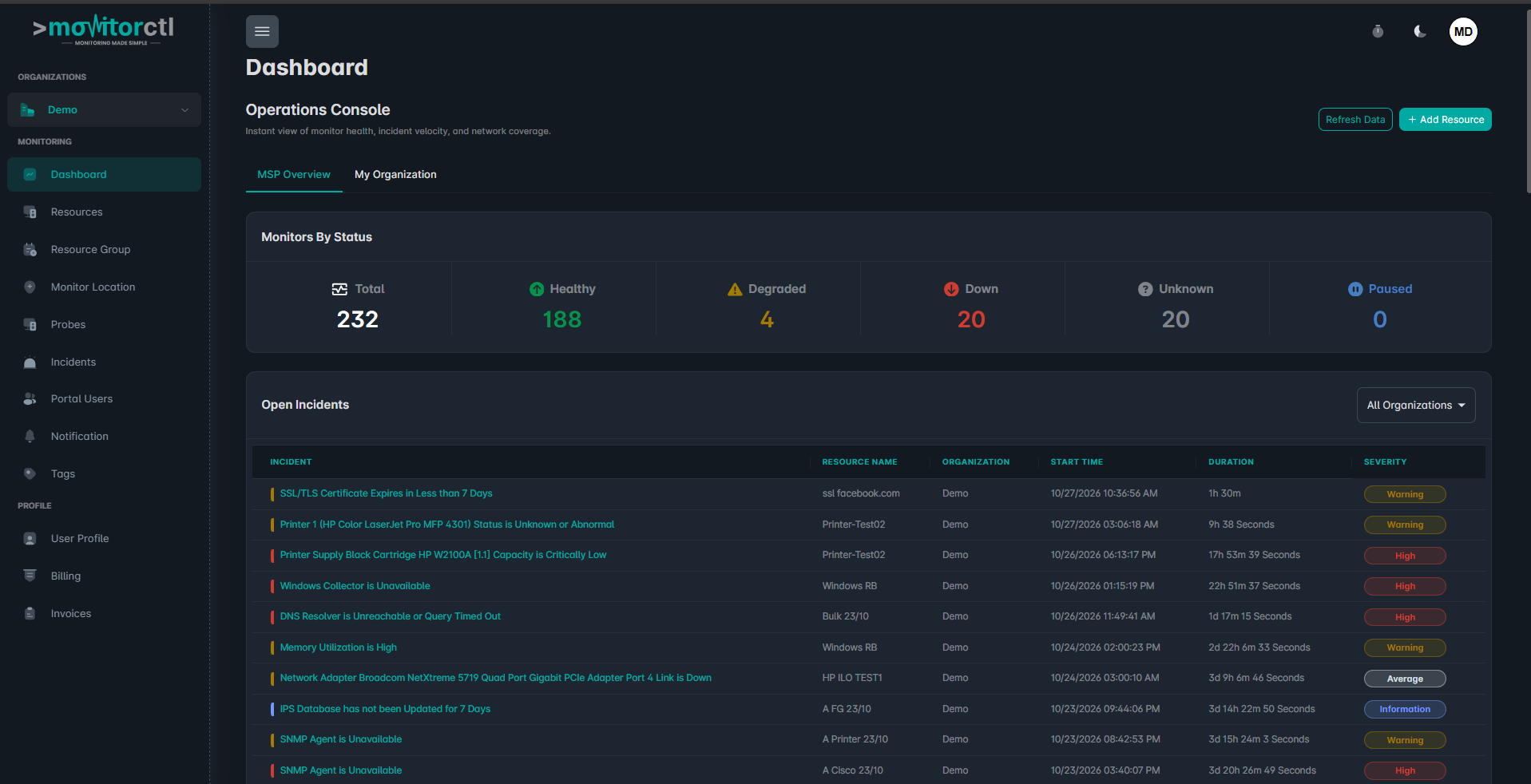
See your monitoring workspace in action.
Watch a walkthrough of the MonitorCTL workspace. Use the player controls to pause or view it full screen.
A CONNECTED VIEW OF YOUR SYSTEMS
From your public website
to your private network.
Bring the signals that matter into one place, with monitoring built around your environment.

Keep your websites in sight.
Track availability and response times. Stay ahead of expiring certificates, domain renewals, and DNS issues.
HTTP/S · SSL · DNS · Domain expiry

Understand your network.
Watch internet links, servers, and network devices. Use private probes to bring internal infrastructure into view.
SNMP · Ping · TCP ports · Private probes

Give your team the context.
Send notifications to the right channels. Use acknowledgements, comments, and maintenance windows to coordinate your response.
Notifications · Team access · Incident context
MORE CONTROL. LESS EFFORT.
Powerful features. Simple monitoring.
Choose how you monitor, keep the right people informed, and give your team the context to respond.

Multilocation Checks
Check availability from multiple global locations to understand what your users experience.

Tailored Notifications
Choose supported notification channels and keep the right people informed when a monitor needs attention.

Response Times
Follow response-time graphs to spot slowdowns and investigate performance changes.

Advanced Parameters
Configure supported monitoring options and metrics to suit your websites and devices.

Maintenance Mode
Schedule maintenance windows for planned work and manage monitoring during maintenance activities.

Data Retention
Review up to 24 months of monitoring history, depending on your plan, to follow trends over time.

Multi Tenancy
Manage separate monitoring environments from one dashboard with a multitenant workspace.

Event Enrichment
Add acknowledgements and comments to events so your team can investigate with shared context.
Feature availability, monitoring locations and data retention vary by plan.
BUILT FOR THE NETWORK BEHIND THE WEBSITE
Your infrastructure
doesn’t end at the internet.
Bring internal servers and network devices into your monitoring workflow. A MonitorCTL probe connects your private environment to the cloud platform, so your team can see more of the systems it depends on.
- Monitor routers, switches, firewalls, and servers
- Track internet-link availability and bandwidth utilization
- Review internal and external monitoring in one platform
A SIMPLE VIEW OF THE CONNECTION
MonitorCTL cloud platform
↓
YOUR PRIVATE ENVIRONMENT
MonitorCTL probe
↓
Network devices · Servers · Internet links
Simplified architecture · Deployment requirements vary.
FROM SETUP TO VISIBILITY
Start small. See more.
Begin with a public website. Add more of your environment as your monitoring needs grow.
01 / ADD
Choose what matters.
Add your website or endpoint and choose the right monitor type. For private infrastructure, configure a probe in your environment.
02 / CONNECT
Bring your team into the loop.
Choose notification channels and the people who need to know. Set monitoring options to suit your services and plan.
03 / UNDERSTAND
See the signal. Take action.
Review availability and performance over time, investigate events, and keep your team informed as issues are resolved.
ALERTS WHERE WORK HAPPENS
The right update.
In the right channel.
Connect monitoring to the tools your team already uses, from email and chat to service management. Available integrations depend on your plan.

Slack

Microsoft Teams


Webhooks

PagerDuty

ServiceNow
GOOD QUESTIONS. CLEAR ANSWERS.
A little clarity
before you start.
Find the right monitoring approach for your websites, infrastructure, and team.
What can I monitor with MonitorCTL?
MonitorCTL supports website availability, SSL certificates, domain expiry, DNS, ping, TCP ports, internet links, and internal infrastructure. Monitor types and advanced features depend on your plan.
Can I start for free?
Yes. The Launch plan currently includes 50 monitors with no credit card required. Check the pricing page for supported monitor types and limits.
Can I monitor devices on a private network?
Yes. A MonitorCTL probe deployed in your environment can monitor internal infrastructure. See enterprise monitoring for an overview, or contact the team to discuss your setup.
How will my team receive alerts?
MonitorCTL offers email and integrations with tools including Slack, Microsoft Teams, webhooks, and service-management platforms. Available channels vary by plan.
How do I choose a plan?
Start with the number and types of monitors you need, then consider monitoring frequency, data history, probes, and team access. Compare plans or talk to the team about your requirements.
MAKE MONITORING PART OF YOUR EVERYDAY
Less wondering what’s happening.
More knowing where to look.
Start with 50 free monitors, or talk to us about your infrastructure.
Website and infrastructure monitoring.
A clearer view of what matters.