
Home / Monitoring / Website monitoring

WEBSITE MONITORING
Website uptime
monitoring.
Track website availability, response times, and HTTP behavior with MonitorCTL website uptime monitoring. Spot interruptions, investigate slowdowns, and send alerts to the people who keep your website running.
Monitor types, intervals, and advanced options vary by plan.
Product tour / Overview / Use cases / Getting started / FAQs
BUILT FOR DAY-TO-DAY OPERATIONS
See more than an up-or-down result.
01
Check the response.
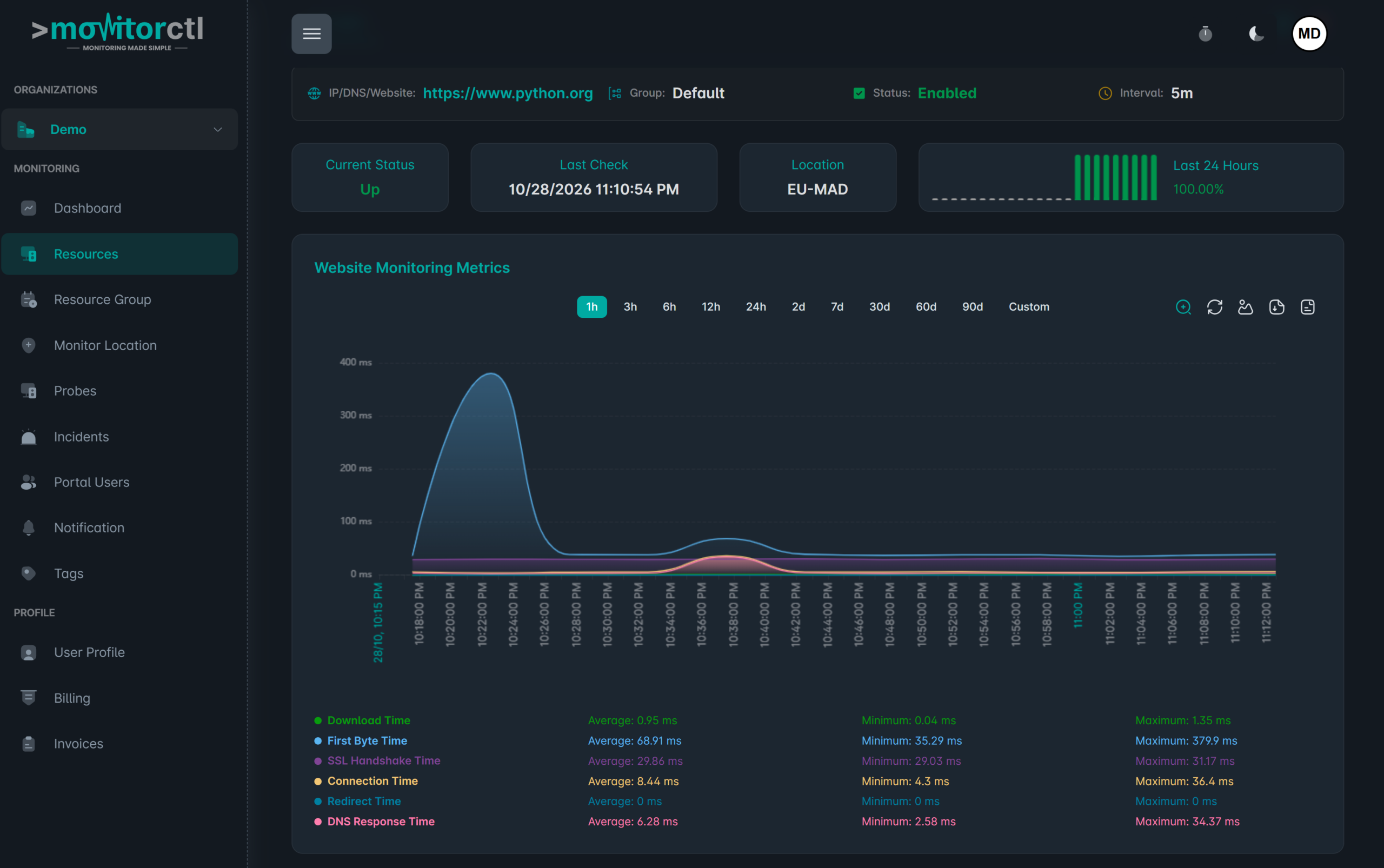
Track whether your website responds as expected. HTTP status and redirect information help you understand what a visitor’s request encounters.
02
Find where time goes.
Review DNS lookup, connection, SSL handshake, server processing, and download timing to give your performance investigation a useful starting point.
03
Keep a record.
Use response-time graphs and availability history to compare current behavior with earlier periods and investigate intermittent problems.
See website performance in context.
Watch a walkthrough of the MonitorCTL workspace. Use the player controls to pause or view it full screen.
WHERE IT HELPS
A practical starting point
for your web operations.
Bring the health of your public websites into the same monitoring workflow as your infrastructure. Choose the checks and notification channels that fit each service.
Go beyond an availability check: use synthetic website monitoring for browser journeys and API monitoring for authenticated requests and expected responses.
Customer-facing websites
Keep important landing pages and business websites under observation.
Performance investigations
Compare timing components when a site responds more slowly than expected.
Planned changes
Use maintenance windows while your team carries out scheduled work.
FROM CONFIGURATION TO CONTEXT
Make the first check count.
01 / SETUP
Add a URL
Create a website monitor for the address you want to check.
02 / SETUP
Choose your checks
Set available locations, monitoring options, and notification recipients.
03 / SETUP
Review and respond
Follow availability and response-time history, then investigate alerts with your team.

KEEP THE RIGHT PEOPLE INFORMED
Bring alerts into your team’s workflow.
Choose email or supported integrations such as Slack, Microsoft Teams, and webhooks. Use maintenance windows for planned work and acknowledgements or comments to add incident context.
Notification channels and workflow features depend on your plan.
A FEW USEFUL ANSWERS
Know what your
check tells you.
What does website monitoring check?
It checks website availability and response behavior, with HTTP status, redirects, and timing information. Available parameters depend on the monitor configuration and plan.
Is response time the same as page-load time?
No. An HTTP response-time check measures the monitored request. It does not, by itself, measure a complete browser session or every resource on a page.
Can I monitor from different locations?
MonitorCTL offers monitoring locations that you can select in the product. Check your plan for the locations and monitoring frequency available to your account.
Can I start with the free plan?
MonitorCTL’s Launch plan includes 50 monitors with no credit card required. Review the pricing page for supported monitor types, intervals, and limits.
BUILD A MORE COMPLETE VIEW
The next useful signal.

SSL monitoring
Certificates & trust

DNS monitoring
Name resolution
Domain expiration monitoring
Domains & continuity
Give your website
a clearer line of sight.
Choose the monitoring that fits your environment. Start with a free account, or talk with us about your infrastructure.
Website and infrastructure monitoring.
A clearer view of what matters.