
Home / Monitoring / Ping monitoring

PING MONITORING
Ping monitoring.
Know what is up.
Use ICMP ping monitoring to track device reachability, latency, and packet loss. MonitorCTL gives your team a useful connectivity signal alongside the health of your network and services.
Monitor types, intervals, and advanced options vary by plan.
Product tour / Overview / Use cases / Getting started / FAQs
BUILT FOR DAY-TO-DAY OPERATIONS
Start with the connectivity fundamentals.
01
Check whether it responds.
Observe whether a host or device answers ICMP requests from the monitoring location. Get notified when reachability changes.
02
Watch latency and loss.
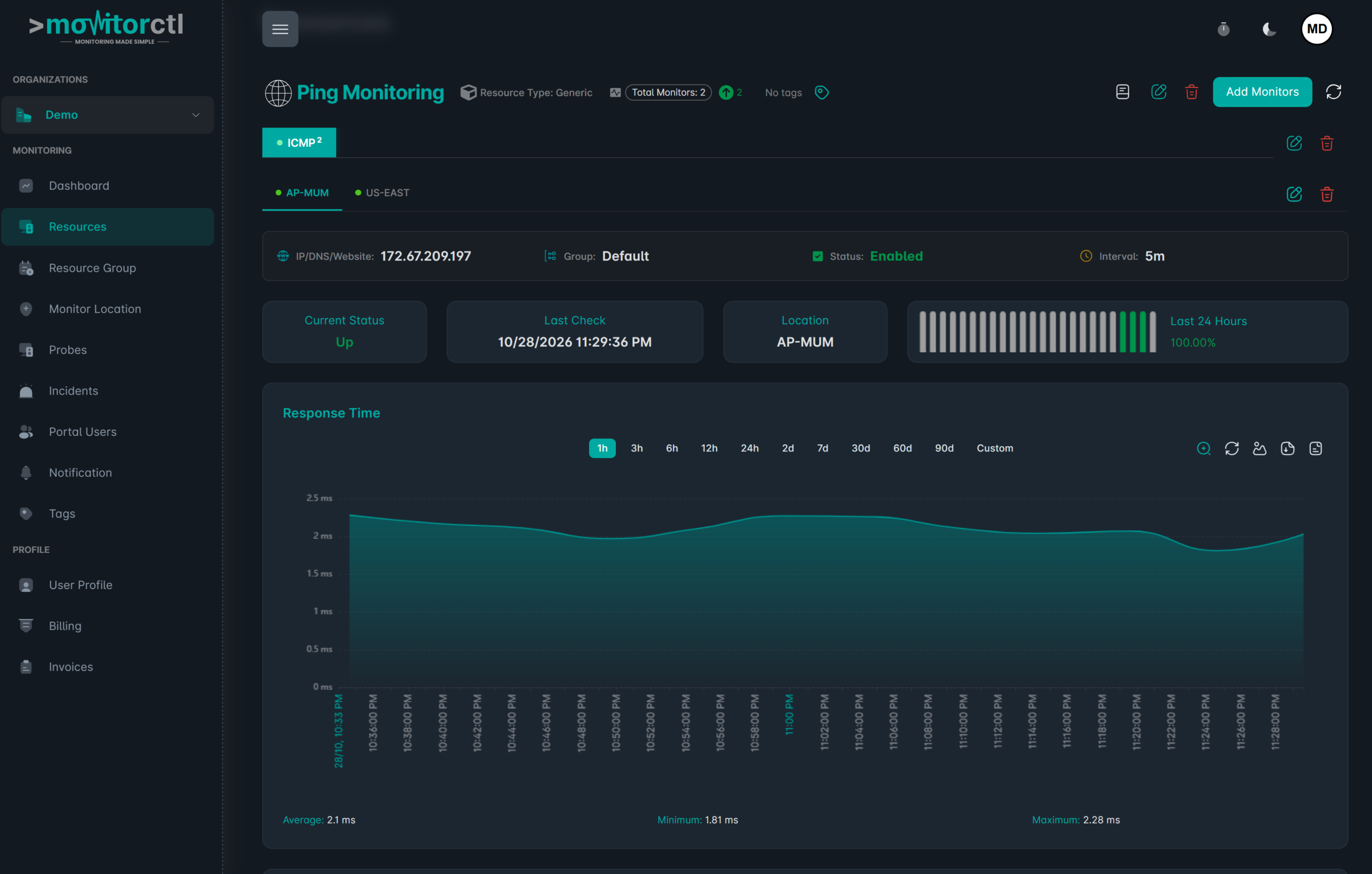
Review response times and packet loss to identify degraded connectivity even when the target is still reachable.
03
Recognize recurring patterns.
Use historical graphs to compare current behavior with earlier periods and investigate intermittent network problems.
See reachability over time.
Watch a walkthrough of the MonitorCTL workspace. Use the player controls to pause or view it full screen.
WHERE IT HELPS
A simple check.
A useful diagnostic signal.
Ping is one layer of visibility. Pair it with TCP port checks or device metrics when you need to understand more than whether a host responds.
A host can answer a ping while a service is unavailable. Add TCP port monitoring for service connections and SNMP monitoring for supported device metrics.
Routers and gateways
Keep an eye on the reachable network devices your users depend on.
Servers and endpoints
Track host availability from the configured monitoring location.
Network investigations
Compare latency and loss trends with reported connectivity problems.
FROM CONFIGURATION TO CONTEXT
Make the first check count.
01 / SETUP
Choose the target
Add the hostname or IP address you are authorized to monitor.
02 / SETUP
Check the path
Ensure ICMP is allowed from the selected monitoring location or private probe.
03 / SETUP
Review the signal
Configure notifications and follow reachability, latency, and loss over time.

KEEP THE RIGHT PEOPLE INFORMED
Bring alerts into your team’s workflow.
Choose email or supported integrations such as Slack, Microsoft Teams, and webhooks. Use maintenance windows for planned work and acknowledgements or comments to add incident context.
Notification channels and workflow features depend on your plan.
A FEW USEFUL ANSWERS
Know what your
check tells you.
What does a successful ping tell me?
It shows that the target responded to an ICMP request from the monitoring location. It does not prove that every application or service on that target is working.
Why might a reachable server fail a ping check?
A firewall or device policy may block or limit ICMP. Review the network path and target configuration before treating an unanswered ping as a confirmed application outage.
Can I monitor latency and packet loss?
Yes. MonitorCTL’s ping service describes latency, packet loss, response stability, and historical availability graphs.
Can I check devices inside my network?
Use an appropriately configured private probe for internal targets. Confirm network access and the monitor options available in your plan.
BUILD A MORE COMPLETE VIEW
The next useful signal.

TCP port monitoring
Service connectivity

SNMP monitoring
Device health & performance

Internet link monitoring
WAN & connectivity
Make reachability
a visible signal.
Choose the monitoring that fits your environment. Start with a free account, or talk with us about your infrastructure.
Website and infrastructure monitoring.
A clearer view of what matters.